
📖 IPTV Setup Guide 2026
Complete step-by-step setup — from zero to watching your first channel in 30 minutes. No prior knowledge needed.
📊 Step 1: Check your internet
Test at fast.com:
- < 25 Mbps — HD only
- 25-50 Mbps — 4K possible but tight
- 50+ Mbps — 4K comfortable
- 100+ Mbps — multiple 4K streams
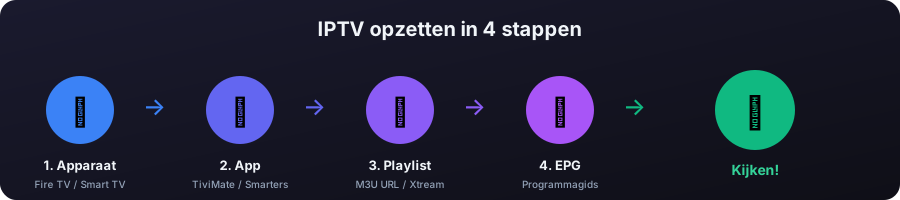
📱 Step 2: Choose device
- Best value: Fire TV Stick 4K Max ($70)
- Modern: Chromecast with Google TV ($60)
- Apple users: Apple TV 4K ($170)
- Premium: NVIDIA Shield Pro ($220)
- Already have a Smart TV? Use the built-in app store
📲 Step 3: Install app
- Android TV / Fire TV: TiviMate (sideload on Fire TV via Downloader)
- iOS / Apple TV: Smarters Player Lite (App Store)
- Smart TV: Smart IPTV or IPTV Smarters from TV store
- PC: IPTVnator (free, open source)
🔗 Step 4: Add your playlist
Free legal source (to test)
Before paying for a provider, test with free IPTV-org channels:
https://iptv-org.github.io/iptv/index.m3uEPG:
https://iptv-org.github.io/epg/guides/uk/sky.com.epg.xmlIn your app:
- Add Playlist → M3U Playlist (or Xtream Codes for paid providers)
- Paste the URL
- Add EPG URL separately
- Save → channels load
📅 Step 5: Configure EPG
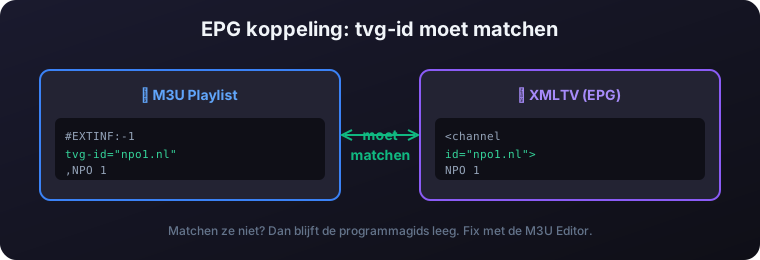
If the EPG is empty, the tvg-id in your M3U doesn't match the channel id in the XMLTV. Fix it with our M3U Editor.
⚙️ Optimization
- Increase buffer to 6000-8000ms (reduces stutter)
- Enable hardware decoding for smooth 4K
- Use wired ethernet instead of WiFi if possible
- Set up favorites and channel groups
❓ Frequently Asked Questions
How long does it take to set up IPTV?
Most people go from zero to watching their first channel in about 30 minutes. The five steps are checking your internet, choosing a device, installing an app, adding your playlist, and configuring the EPG. No prior knowledge is needed.
What internet speed do I need to set up IPTV?
Below 25 Mbps you should stick to HD. From 25-50 Mbps 4K is possible but tight, 50+ Mbps makes 4K comfortable, and 100+ Mbps supports multiple 4K streams at once. Test your speed at fast.com before you start.
What is the difference between an M3U and Xtream Codes playlist?
An M3U playlist is a single URL containing your channel list, ideal for testing free sources. Xtream Codes uses a server URL, username and password, and is the usual format for paid providers. Most apps support both under Add Playlist.
Can I test IPTV for free before paying a provider?
Yes. You can load the free legal IPTV-org M3U playlist and a matching XMLTV EPG URL to test your setup before subscribing to any provider. This confirms your device and app work correctly first.
Why is my EPG empty after setup?
An empty EPG usually means the tvg-id in your M3U does not match the channel id in the XMLTV EPG. You can fix the IDs with our M3U Editor so the guide data lines up with your channels.
How do I stop IPTV from stuttering after setup?
Increase the app buffer to 6000-8000ms to reduce stutter, enable hardware decoding for smooth 4K, and use wired ethernet instead of WiFi where possible. Setting up favourites and channel groups also keeps things tidy.