
💾 Record IPTV to a NAS — Complete Guide
Build your own DVR with a Synology or QNAP NAS, Threadfin as the IPTV proxy, and Jellyfin or Plex as the recorder + player.
🎯 What are you building?
A DIY DVR system that:
- 📺 Receives IPTV channels via M3U or Xtream Codes
- 📅 Schedules recordings via the EPG (TV guide)
- 💾 Saves them to your NAS
- 🎬 Plays back on any device (TV, phone, browser)
- 🌐 Works at home and remotely
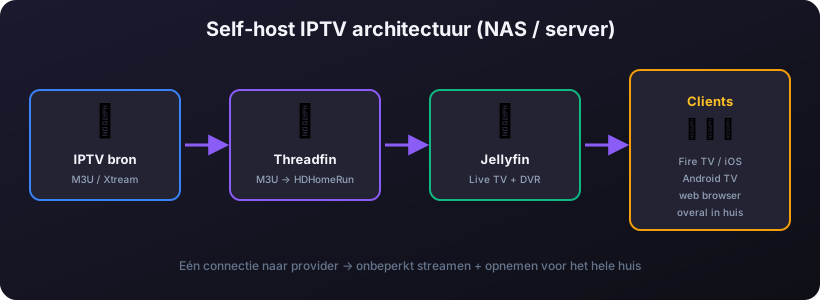
The three components
- Threadfin — an IPTV proxy that converts your M3U into HDHomeRun format (what Jellyfin/Plex expect)
- Jellyfin or Plex — a Live TV + DVR server that records and manages your media library
- Synology or QNAP NAS — hosts both via Docker and stores the recordings
🆚 Synology vs QNAP for IPTV DVR
| Synology | QNAP | |
|---|---|---|
| OS | DSM (polished, user-friendly) | QTS (more powerful, more complex) |
| Docker support | Container Manager (DSM 7.2+) | Container Station |
| Hardware transcoding | Limited (J/Plus models with Intel) | Stronger — more models with HDMI + Intel |
| Jellyfin compatible? | ✅ Yes (Docker) | ✅ Yes (Docker) |
| Plex compatible? | ✅ Native Plex package + Docker | ✅ Native + Docker |
| Recommended models | DS923+, DS224+, DS1522+ | TS-464, TS-664, TS-873A |
| Value for money | Slightly pricier | Often more specs for less |
Tip: for IPTV DVR a NAS with an Intel CPU and integrated GPU (Quick Sync) matters for hardware transcoding. ARM CPUs work, but are slower at conversion.
🔧 Step 1: Install Threadfin (Docker)
Threadfin is a fork of xTeVe — an IPTV proxy that converts your M3U into a format Plex/Jellyfin understand (HDHomeRun emulation).
Docker compose example
version: "3"
services:
  threadfin:
    image: fyb3roptik/threadfin
    container_name: threadfin
    ports:
      - "34400:34400"
    volumes:
      - /volume1/docker/threadfin/conf:/home/threadfin/conf
      - /volume1/docker/threadfin/temp:/tmp/threadfin
    environment:
      - TZ=Europe/Amsterdam
      - PUID=1000
      - PGID=100
    restart: unless-stopped
Configure after install
- Open
http://NAS-IP:34400/web/ - Add your M3U URL under Playlist
- Add your EPG XMLTV URL under XMLTV
- Map channels to the EPG under Mapping
- Configure the number of tuners (= simultaneous recordings/streams)
- Plex/Jellyfin will "find" Threadfin as an HDHomeRun device on port 34400
🎬 Step 2: Jellyfin or Plex — which to pick?
| Jellyfin | Plex | |
|---|---|---|
| Price | ✅ 100% free, open source | Free base, Plex Pass €5/m or €120 lifetime |
| DVR feature | ✅ Included | ⚠️ Plex Pass required |
| Hardware transcoding | ✅ Free | ⚠️ Plex Pass required |
| Mobile apps | ✅ Free | ⚠️ One-off €5 unlock per platform (or Plex Pass) |
| Interface | Basic but functional | Nicer, more user-friendly |
| Remote access | Set up VPN/Tailscale yourself | ✅ Works automatically via Plex relay |
| IPTV DVR stability | ✅ Good | ✅ Good, a touch more polished |
Recommendation: start with Jellyfin — free, everything included. Switch to Plex if you want a nicer interface and are happy to invest in Plex Pass.
⚙️ Step 3: Install Jellyfin (Docker)
version: "3"
services:
  jellyfin:
    image: jellyfin/jellyfin
    container_name: jellyfin
    ports:
      - "8096:8096"
    volumes:
      - /volume1/docker/jellyfin/config:/config
      - /volume1/docker/jellyfin/cache:/cache
      - /volume1/media:/media
      - /volume1/recordings:/recordings
    devices:
      - /dev/dri:/dev/dri  # Intel Quick Sync (Intel NAS only)
    environment:
      - TZ=Europe/Amsterdam
    restart: unless-stopped
Connect the DVR to Threadfin
- Open Jellyfin at
http://NAS-IP:8096 - Go to Dashboard → Live TV
- Add a tuner: type HDHomeRun, URL:
http://NAS-IP:34400 - Add an EPG source (Threadfin serves XMLTV on the same port)
- Set the recording path:
/recordings - Done — channels appear under "Live TV"
💽 Storage calculation
How much space do you need for recordings? It depends on the resolution and bitrate of your IPTV provider:
| Quality | Bitrate (typical) | Per hour | Per day (8h) | Per month |
|---|---|---|---|---|
| SD | 2-3 Mbps | ~1 GB | ~8 GB | ~240 GB |
| HD 720p | 4-5 Mbps | ~2 GB | ~16 GB | ~480 GB |
| Full HD 1080p | 6-8 Mbps | ~3.5 GB | ~28 GB | ~840 GB |
| 4K UHD | 15-25 Mbps | ~10 GB | ~80 GB | ~2.4 TB |
Recommended NAS storage
- Light use: 2× 4TB in RAID 1 = 4TB usable — good for ~150 hours of 4K or 1000 hours of HD
- Average: 4× 8TB in RAID 5 = 24TB usable — series, films, recordings for years
- Heavy: 4× 16TB in RAID 5 or SHR-2 = 48TB+ — for the true hoarder
Tip: use NAS-grade drives like WD Red Plus, Seagate IronWolf or Toshiba N300. No desktop drives — they won't survive 24/7 NAS duty for long.
🌐 Network tips
- Wire your NAS — IPTV streams + recordings are network-intensive, WiFi is unstable
- Gigabit minimum — 100 Mbps gets tight with multiple 4K streams at once
- A separate VLAN for IPTV traffic if your router supports it (UniFi, OPNsense)
- Internet downstream determines how many channels you can stream at once: ~10 Mbps per 1080p stream
- Remote access via Tailscale or WireGuard (Jellyfin) or Plex relay (Plex)
⚠️ Common problems
"No tuners available"
- Increase the number of tuners in Threadfin → Settings → Buffer
- The provider has a connection limit — check your subscription
"Recording starts but the file is corrupt"
- Set the Threadfin buffer to FFmpeg instead of Streaming mode
- Codec mismatch — enable Jellyfin transcoding
- NAS too slow — check CPU usage during recording
"EPG mismatch, wrong programme recorded"
- The time zone in Threadfin and Jellyfin must match exactly
- The EPG XMLTV is sometimes shifted 30 min — set a manual offset
- The tvg-id in the M3U must match the EPG ids
🆚 NAS DVR vs Catch-Up TV
| NAS DVR | Catch-Up TV | |
|---|---|---|
| Investment | €500-€2000+ NAS + drives | €0 (included in IPTV sub) |
| What you record | Anything you schedule in advance | Only what the provider records (1-14 days) |
| Retention | Unlimited (as long as storage lasts) | Usually max 14 days |
| Works offline | ✅ Yes | ❌ No, internet required |
| Best for | Series, films, archive | "Oh, I forgot to watch that" |