
📅 IPTV EPG Guide — XMLTV Setup
What is an EPG, how do you add a program guide to your IPTV app, and where do you find free EPG sources? Plus how tvg-id matching works.
Advertisement
🤔 What is XMLTV?
XMLTV is an open data format for TV program guides. An XMLTV file contains all programs for all channels, several days ahead. IPTV apps read this data and link it to your channels via tvg-id.
🌍 Free EPG sources
iptv-org EPG (worldwide, free)
- UK:
https://iptv-org.github.io/epg/guides/uk/sky.com.epg.xml - US:
https://iptv-org.github.io/epg/guides/us/tvtv.us.epg.xml - Germany:
https://iptv-org.github.io/epg/guides/de/hd-plus.de.epg.xml
Full list: github.com/iptv-org/epg
EPG.best
Free tier: 100 channels, 7 days. Premium: 5000+ channels, 14 days.
Advertisement
🔧 Adding EPG per app
TiviMate
Settings → EPG → Add EPG source → paste XMLTV URL → update interval 12h.
IPTV Smarters Pro
Settings → EPG → External EPG → paste URL.
Kodi
PVR IPTV Simple Client → EPG Settings → XMLTV URL → restart Kodi.
🔗 tvg-id matching
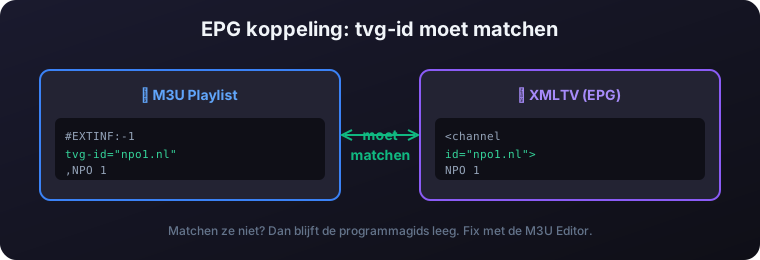
The EPG only works if tvg-id in your M3U matches the channel id in the XMLTV. If they don't match:
- Edit your M3U with our M3U Editor
- TiviMate: long-press channel → Edit → Stream ID
- OTT Navigator has fuzzy auto-matching on channel name
Test your EPG with our EPG Viewer tool.