
🔧 How to Fix IPTV Buffering
IPTV buffering, stuttering or freezing? Here's the complete fix guide covering every cause — from internet speed to app settings.
📊 1. Check your internet
- Test at fast.com — need 25+ Mbps for HD, 50+ for 4K
- Slow? Set lower quality in app or upgrade your plan
- Ask provider for HEVC streams (50% less bandwidth)
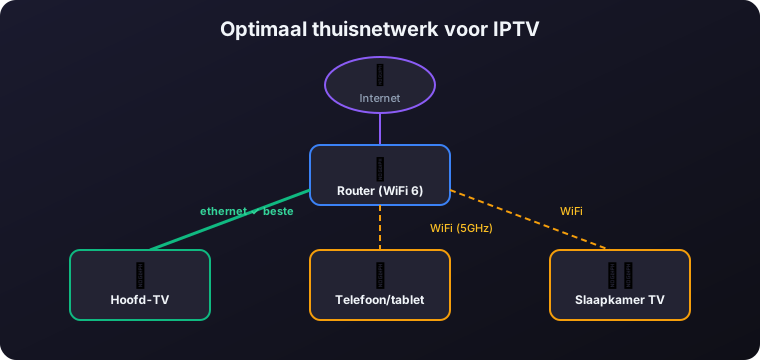
📡 2. Switch from WiFi to ethernet
- Wired ethernet has ~0% packet loss — fixes 90% of buffering
- Can't run cable? Use powerline adapters or WiFi 6 mesh
- On WiFi: use 5 GHz band, move closer to router
⚙️ 3. Increase app buffer
- TiviMate: Settings → Playback → Buffer → 8000ms
- Enable hardware acceleration
- OTT Navigator / Kodi: similar buffer settings
🌐 4. Network tweaks
- Switch DNS to Cloudflare 1.1.1.1 or Google 8.8.8.8
- Force IPv4 in app settings
- Enable QoS on router — prioritize IPTV device
- Reboot router (30 sec off)
🕐 5. Peak-hour buffering
Only buffers 7-10 PM? Your provider's server is overloaded. Ask for an alternative server, or consider a better provider.
🎬 6. Only 4K/sports buffers
4K needs 18+ Mbps and a device with HEVC hardware decode. Old Fire TV Sticks can't handle 4K smoothly — upgrade to Fire TV Stick 4K Max or NVIDIA Shield.
❓ Frequently Asked Questions
Why does my IPTV keep buffering?
Buffering usually comes from slow internet, an unstable WiFi connection, a small app buffer, or an overloaded provider server at peak times. Test your speed at fast.com, switch to wired ethernet, raise the buffer, and ask your provider for an alternative server.
Does switching from WiFi to ethernet stop IPTV buffering?
Yes, in most cases. A wired ethernet connection has close to 0% packet loss and fixes around 90% of buffering problems. If you cannot run a cable, use powerline adapters or a WiFi 6 mesh, and on WiFi use the 5 GHz band and move closer to the router.
What buffer setting should I use to fix IPTV buffering?
Increase the buffer to around 8000ms. In TiviMate go to Settings, Playback, Buffer and set 8000ms, and enable hardware acceleration. OTT Navigator and Kodi have similar buffer settings.
Why does my IPTV only buffer in the evening?
If buffering only happens between 7 and 10 PM, your provider's server is overloaded during peak hours. Ask your provider for an alternative server, or consider switching to a more reliable provider.
Why does only 4K or sports buffer on my IPTV?
4K needs at least 18 Mbps and a device with HEVC hardware decoding. Older Fire TV Sticks cannot handle 4K smoothly, so upgrade to a Fire TV Stick 4K Max or an NVIDIA Shield for stutter-free playback.
Can changing my DNS reduce IPTV buffering?
It can help. Switching to Cloudflare 1.1.1.1 or Google 8.8.8.8 often improves stream stability. Also try forcing IPv4 in the app, enabling QoS on your router to prioritise the IPTV device, and rebooting the router.